App Store Optimization, on your Mac
App Store localization that starts with how people search
App Store localization adapts your listing to the language, search habits, and expectations of a market. Start with a few countries you can support, research what people mean by their searches, and then write metadata that accurately describes your app.
See AppNorth for Mac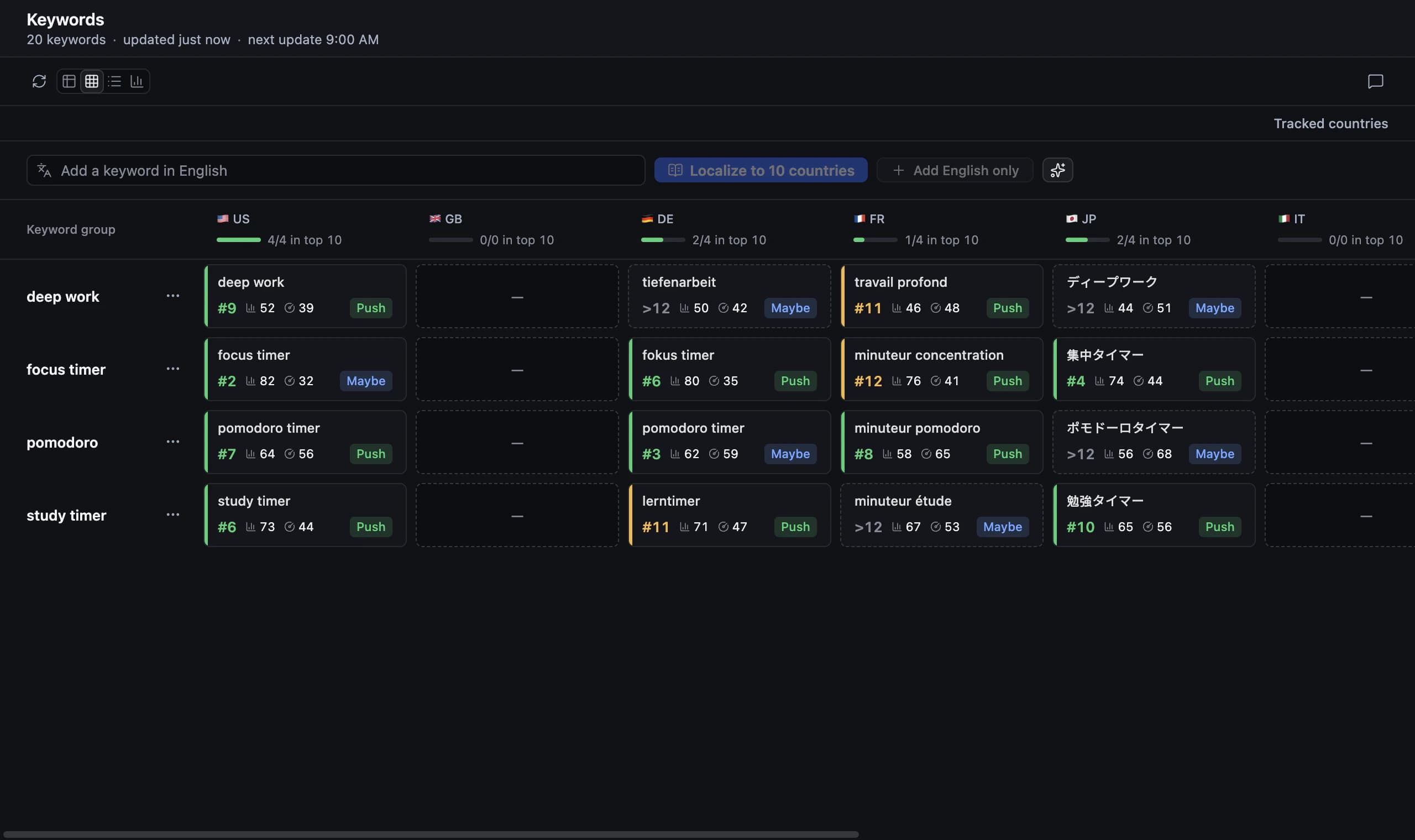
Plan App Store localization by country and language
A country is a market; a localization is a language version of your metadata. Treat them as separate decisions. Start by choosing a country where your product solves a clear problem, then identify the listing languages worth maintaining there. A translated listing also creates expectations about onboarding, support, and the app itself.
Give each candidate market a short brief: intended user, main task, supported product languages, available support, and a reason to prioritize it. Choose a manageable first release rather than translating everything at once. If you cannot assess the wording or help a user who gets stuck, budget for that work before adding another language.
Use a language list as a planning reference
An app store localization languages list tells you which metadata locales are available, but it does not choose your expansion strategy. Apple distinguishes regional variants such as Spanish for Spain and Mexico, and Portuguese for Portugal and Brazil. Check Apple’s current App Store localizations reference when mapping your target countries to supported listing languages.
Build your own working list with a reviewer and maintenance owner for every locale. Record regional terminology, date formats used in screenshots, and features unavailable in that market. Reusing a language can save work, but still review the examples and promises. A fluent sentence can describe a workflow that makes little sense to the intended audience.
Do multilingual app keyword research before translating
Begin with the task users want to complete, then gather local ways of describing it. Inspect search results in the target country and ask whether the apps match your product’s purpose. A direct translation is a candidate, not evidence. Discard terms whose results suggest a different audience, even when the words look relevant in a dictionary.
Consider PocketPlot, a fictional gardening app used here as an example. For Spain, compare “huerto”, “riego”, and “plantas” as distinct search intents rather than interchangeable translations. If PocketPlot schedules watering but cannot identify plants, exclude identification queries. Write down the product fit and result observations before deciding which terms deserve space in the listing.
Localize the App Store listing as one coherent message
When you localize an App Store listing, assign each field a purpose. The name identifies the product, the subtitle explains its useful distinction, and the keyword field holds relevant search terms. Apple’s name and subtitle limits are 30 characters each; the keyword field allows 100 characters, is comma separated, and is not visible to users.
Draft in the target language instead of trimming an English sentence until it fits. Keep the visible promise understandable without the description, then use the description to explain the workflow and limitations. Review screenshot text alongside the metadata. If a screenshot promises automatic watering but the app only sends reminders, correct the promise before publishing any language.
Research and draft localizations in AppNorth
AppNorth is a Mac app with App Store keyword research across all 175 countries and listing localization to 50 languages. Adding a country localizes existing keyword groups for it. Use those groups as a starting point for review, then inspect country results and competitors instead of assuming the localized terms have equivalent intent.
For name, subtitle, and keywords, AppNorth offers three AI drafts scored by reach and difficulty against your current listing within Apple’s character limits. Promotional text and description can also be localized, and DeepL can translate keywords. AI features use your own supported CLI and provider; review the language, product claims, and keyword choices yourself.
Review, publish a draft, and learn by country
Before approving a localization, ask a native reader to explain what they think the app does from the listing alone. Check that important features exist in that language and that the screenshots use consistent vocabulary. Keep a dated copy of the previous metadata and a short note about the intent each change is meant to address.
AppNorth previews approved changes and fills a draft version in App Store Connect; it never submits the app for review. Its iPhone rank tracking provides positions up to 250 per keyword and country with daily history. Compare the same country and searches over time, and examine store performance separately before deciding whether to keep or revise the copy.
Before you start
Which languages should I localize my App Store listing into first?
Start with languages you can review and markets where the product is useful today. Consider existing user questions, country search results, product language support, and the cost of maintaining screenshots and help content. A small set of well reviewed localizations gives you a clearer learning process than a large collection of unverified translations.
Is translating my description enough for App Store localization?
A description is only part of the listing. Review your name, subtitle, keywords, screenshots, and product promises together. Start with local search intent, then make the visible copy explain the same product accurately. A translated description cannot fix a subtitle aimed at the wrong task or screenshots showing an unsupported feature.
Does AppNorth show keyword popularity in every language?
AppNorth shows Apple’s official Apple Ads popularity when you connect your own Apple Ads account. Without that connection, popularity displays “—”; AppNorth does not estimate search volume. Its difficulty indicator is based on apps already ranking for a search. Use that signal alongside relevance and country results rather than treating it as a ranking promise.
Can I localize my listing before the app supports that language?
Treat this as a product decision before a metadata task. A localized listing may attract people who expect the interface and support in that language. Make the actual language support clear and test the onboarding experience with a local reader. If the core task becomes confusing, prioritize the product translation before expanding the listing.
Keep exploring
AppNorth · macOS
Turn your research into a better listing.
€99.99 once. Lifetime license for 2 Macs, with updates included.
AI features use your own agent CLI: Claude Code, Codex, Gemini CLI, OpenCode, Cursor, Grok or Ollama. No AppNorth AI credits; your provider’s terms and costs still apply.
See AppNorth for MacmacOS only. No free tier or trial. No voluntary refunds; legal exceptions apply. Read the refund policy.