App Store Optimization, on your Mac
App Store keyword research tool for a relevant shortlist
An App Store keyword research tool helps you turn a product idea into a shortlist of searches worth targeting. Begin with the problem your app solves, inspect the results in the country you care about, and only then compare popularity and difficulty. AppNorth supports this research before or after you publish an app.
See AppNorth for Mac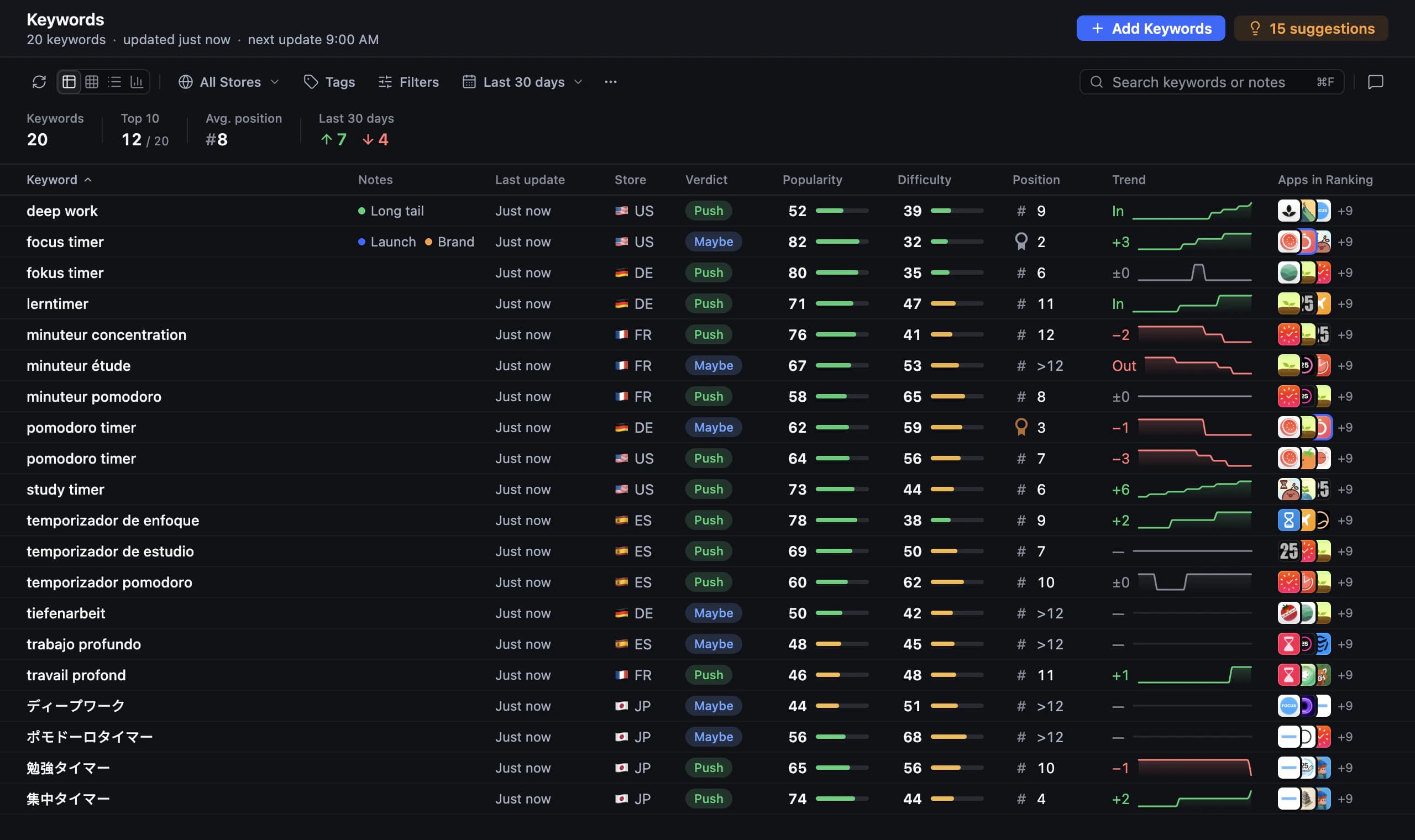
Use an App Store keyword research tool to test intent
Write down what someone would need immediately before searching for your app. Include the task, the situation, and the outcome: “packing list,” “camping checklist,” and “trip planner” might sound related, but they can describe different products. Open the search results and ask whether someone choosing those apps would reasonably consider yours. Keep broad inspiration separate from terms you intend to target.
For example, “TrailBag” is a made-up packing checklist app. If a search mainly returns route planners, that result is a reason to reconsider the phrase, even if the words sound outdoorsy. AppNorth lets you research without an app for this early exploration, or add a published app by link or search when you want to work from an existing product.
Research the country before translating the shortlist
Treat each keyword and country combination as a separate research question. Start where you understand the audience and can support the product well. When expanding, write down local ways of describing the task, then inspect their results. Translation gives you candidate phrases; it does not establish that a phrase has useful demand or returns apps serving the same need.
AppNorth covers keyword research in all 175 App Store countries. Adding a country localizes existing keyword groups for it, giving you a starting point to review. It also supports Google Play keyword research. Keep Play Store keyword research separate from your App Store conclusions: compare the actual results in each store before carrying a candidate from one shortlist into the other.
Read popularity and difficulty as different signals
Popularity helps you compare interest; difficulty helps you consider the competition around a search. Neither replaces relevance, and neither tells you how many installs a listing change will produce. A highly relevant phrase with more manageable competition can be worth exploring before a broader phrase. Keep notes explaining your choice so you can revisit the reasoning when rankings change.
AppNorth shows Apple’s official Apple Ads popularity only after you connect your own Apple Ads account. Onboarding is free and needs no campaign or card. Without that connection, popularity shows “—”; AppNorth never invents or estimates search volume. Its difficulty indicator is based on apps already ranking for the search. Treat that indicator as a signal to investigate, not a promise that you will rank.
Choose terms you can explain in the listing
Reduce the candidate list before drafting metadata. For each term, ask whether the current product satisfies the intent, whether the results look relevant, and why the opportunity deserves attention now. Keep speculative ideas apart from the immediate shortlist. Reject a phrase if it implies a feature you do not offer, even when the popularity looks attractive or competitors use it.
For the fictional TrailBag app, “camping checklist” could stay on the shortlist if its results match packing preparation; “live trail navigation” should be rejected if navigation is absent. In AppNorth, a product brief and a “Don’t target” list keep AI suggestions on the product. When preparing App Store metadata, work within 30 characters for the name, 30 for the subtitle, and 100 for the keyword field.
- Record the target country and the user need behind each candidate.
- Note why the current results support or contradict your proposed intent.
- Choose a small initial set you can track and review after publishing.
Turn research into a change you can evaluate
Save your current wording and a baseline of target positions before editing the listing. Write a simple hypothesis, such as making the packing use case clearer in the subtitle. After publication, look for a pattern across relevant searches over several observations. Avoid crediting one keyword movement to your text alone; competitors and the search results around your app may also have changed.
AppNorth offers three AI drafts for the name, subtitle, and keywords, scored by reach and difficulty against the current listing. Review the wording before approving it. For iPhone, keyword positions are tracked up to 250 per country with daily history and a configurable checking frequency. That history helps you revisit your shortlist; it does not establish whether visibility turned into installs or whether your hypothesis caused the movement.
Before you start
Can I do App Store keyword research free of charge?
For an initial check, AppNorth’s free web keyword checker shows the top 25 App Store results for a keyword and country. Use it to inspect search intent and competing apps. The Mac app is paid: €99.99 once for two Macs, with updates included and no free tier or trial. The free checker is a snapshot, so keep your conclusions limited to what it shows.
Does keyword popularity show exact App Store search volume?
Do not read popularity as a count of searches or expected downloads. In AppNorth, it is Apple’s official Apple Ads popularity, available when you connect your account. Without a connection, the field shows “—”. AppNorth does not estimate volume to fill the gap. Compare popularity alongside relevance, current results, and difficulty before deciding which terms deserve listing space.
Can I research keywords before launching my app?
Yes. AppNorth supports research without an app, so you can explore searches while developing an idea. Describe the proposed core task, pick a country, and inspect the apps returned for several candidate phrases. This can help refine your positioning. Search results alone cannot validate willingness to pay or prove that your planned product will earn downloads.
Should I use the same keywords on Google Play and the App Store?
Use the same product understanding as a starting point, then research each store separately. A phrase may produce a different set of competing apps, so check relevance before reusing it. AppNorth supports keyword research for both stores. Its official Apple Ads popularity source is an Apple signal; do not present it as Google Play search-volume data.
Keep exploring
AppNorth · macOS
Turn your research into a better listing.
€99.99 once. Lifetime license for 2 Macs, with updates included.
AI features use your own agent CLI: Claude Code, Codex, Gemini CLI, OpenCode, Cursor, Grok or Ollama. No AppNorth AI credits; your provider’s terms and costs still apply.
See AppNorth for MacmacOS only. No free tier or trial. No voluntary refunds; legal exceptions apply. Read the refund policy.