App Store Optimization, on your Mac
App Store price localization with a clear reason for each price
App Store price localization means choosing prices that make sense for each market, rather than relying only on currency conversion. Use purchasing power as a starting point, check your costs and product value, and review the final country prices before publishing.
See AppNorth for Mac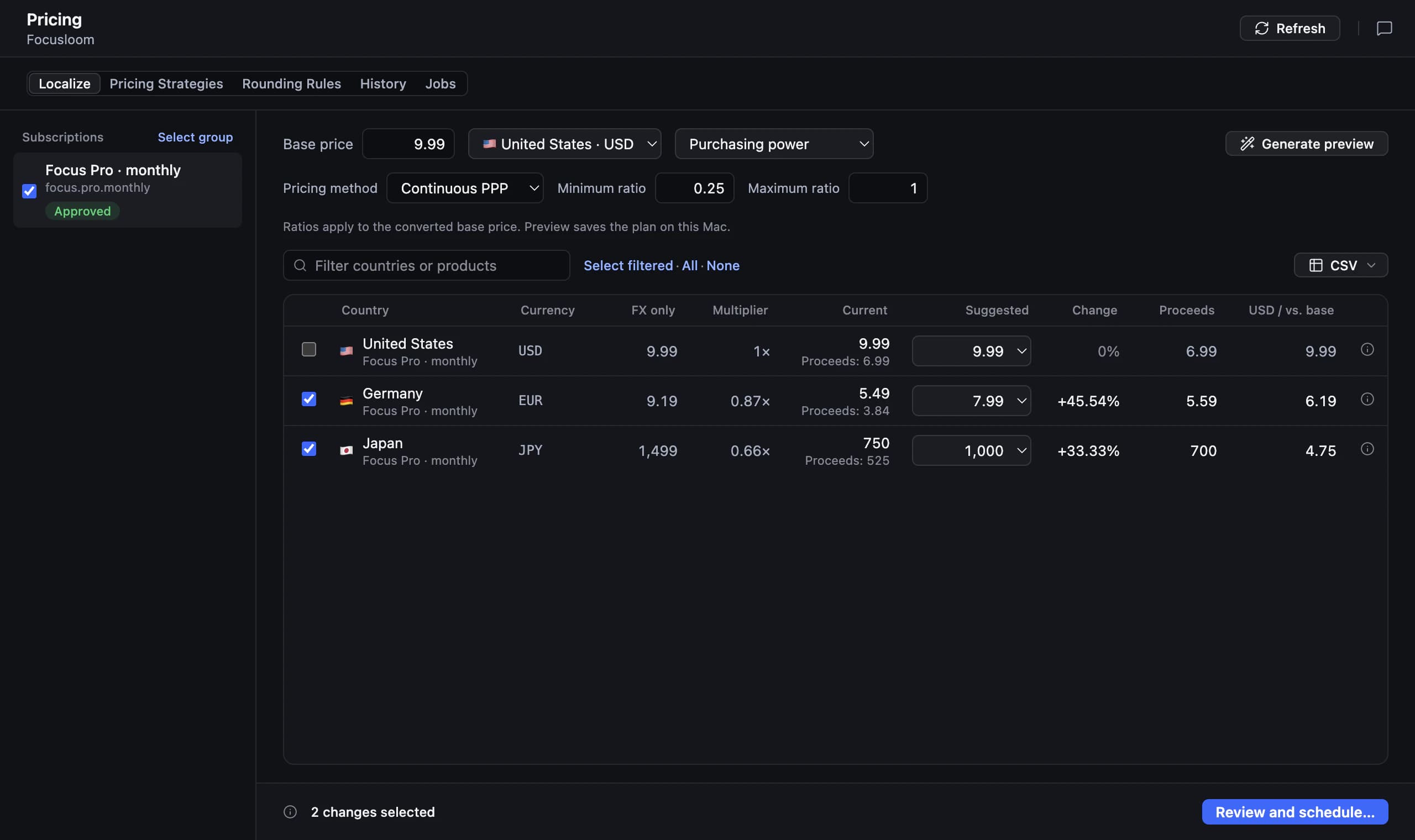
App Store price localization starts with your objective
Define the problem before changing prices. You might want to make a paid app accessible in another market, test whether a subscription feels too expensive, or correct a price that no longer fits your positioning. Write down which product, billing period, and countries you are evaluating so the review has a clear scope.
Currency conversion and localized pricing answer different questions. Apple’s paid-app pricing can generate country prices from a base market using exchange rates and certain taxes. That is useful for managing comparable prices, but your affordability decision still needs product context. Consult the current App Store Connect pricing documentation before choosing which storefronts to manage manually.
Use purchasing power as a starting hypothesis
Purchasing power parity app pricing compares what money can buy across markets rather than treating the exchange rate as the whole story. Use it to propose prices worth reviewing. A country average cannot tell you exactly what your audience will pay, especially when a professional tool and a casual utility serve very different buyers.
Set a floor before accepting a lower price. Consider variable costs such as storage, external services, and support, then examine how the price fits the benefit your app provides. If a suggested price makes ongoing usage uneconomic, keep a higher price or reconsider the offer. Affordability should remain compatible with maintaining the product.
Work through a country price before applying it
Consider TrailLedger, a fictional hiking journal used here as an example. Suppose its annual plan has a reference price of €30 and your illustrative affordability factor for another market is 0.7. The calculation gives €21 before checking the target currency and available store price points. These are made-up inputs, not a recommendation for any country.
Next, inspect the available price points and compare the final customer price with your cost floor and similar offers in that market. Record the chosen amount, currency, annual billing period, and reason for accepting or overriding the proposal. If the final point changes the intended positioning, revise the choice rather than approving it just because the arithmetic worked.
Review subscription price localization as a separate task
For subscription price localization, work on one billing period at a time. Compare monthly plans with monthly plans and annual plans with annual plans, then calculate the relationship between them. A country adjustment applied independently to each can leave the annual option looking inconsistent. Keep introductory offers separate from the regular renewal price during your review.
Before publishing a subscription change, check the current store rules and console settings for existing subscribers, effective dates, notifications, and any consent requirements. Those details depend on the proposed change and platform. Write down the intended treatment of new and existing customers, and verify it in the store console rather than inferring it from a proposed country price.
Prepare localized pricing by country in AppNorth
AppNorth is a Mac app that prepares localized prices in 175 territories using purchasing-power comparisons and rounds them to Apple price points. It can publish price changes to App Store Connect or Google Play. Use the proposed prices as a reviewable starting point, then decide which markets need a different price based on your audience and costs.
Keep the distinction between choosing an amount and reviewing its store-specific application. AppNorth’s documented pricing workflow covers country prices and publishing; check subscription settings and subscriber treatment directly in the relevant console. If you also update your listing or paywall, verify that every stated price and billing period matches what a customer will actually see before purchase.
Publish deliberately and review the commercial result
Before publishing, save the current prices and your reasoning outside the store configuration. Review the product identifier, territory, currency, amount, and billing period for every intended change. Choose a small set of markets if that makes the result easier to interpret. Avoid changing the paywall copy and acquisition strategy at the same time unless there is a clear operational reason.
Afterward, compare purchases, proceeds, retention, and support feedback using the reporting available to you. More purchases alone do not establish that the change helped if proceeds per customer fall or costs rise. Account for promotions, app releases, and traffic changes when interpreting results, and schedule a later review so manually selected prices do not become forgotten settings.
| Review item | What to record | Decision it supports |
|---|---|---|
| Product | Product identifier and billing period | Compare the same offer across markets |
| Customer price | Country, currency, and final store price point | Check the amount buyers will see |
| Commercial floor | Variable costs and minimum acceptable proceeds | Reject unsustainable proposals |
| Subscription handling | New or existing customers; console settings checked | Review the intended audience of the change |
| Follow-up | Previous price, change date, and review date | Explain and revisit the decision |
Before you start
Does Apple automatically localize App Store prices?
For paid apps, Apple can generate country prices from a base market using exchange rates and certain taxes, or you can manage storefront prices manually. That automation does not replace your decision about affordability and product value. Check the current App Store Connect pricing documentation and review which markets you have chosen to manage yourself.
How do I choose localized pricing by country?
Start with a clearly defined product and reference price, then compare purchasing power, audience needs, competing offers, and your variable costs. Review the actual store price point rather than only a converted amount. Keep a written reason for each override, and judge the result using proceeds and customer behavior alongside purchase counts.
Should my subscription cost the same in every country?
There is no universal answer. A professional product aimed at similar business buyers may justify a different approach from a consumer utility serving broad local audiences. Consider affordability, the value delivered, and the cost of supporting usage. Review monthly and annual plans together, and check existing-subscriber handling before making changes.
Does a lower local price guarantee more revenue?
No. A lower price can change who is willing to buy, but you still need enough additional retained customers to support the decision commercially. Track proceeds, variable costs, and customer feedback after the change. A weak result may reflect the offer, product fit, traffic mix, or onboarding rather than price alone.
Keep exploring
AppNorth · macOS
Turn your research into a better listing.
€99.99 once. Lifetime license for 2 Macs, with updates included.
AI features use your own agent CLI: Claude Code, Codex, Gemini CLI, OpenCode, Cursor, Grok or Ollama. No AppNorth AI credits; your provider’s terms and costs still apply.
See AppNorth for MacmacOS only. No free tier or trial. No voluntary refunds; legal exceptions apply. Read the refund policy.