App Store Optimization, on your Mac
ASO tool for Mac: turn research into listing decisions
An ASO tool for Mac should help you decide which searches to target, what to change in your listing, and whether those changes improved visibility. Build a repeatable workflow around those decisions before comparing feature lists. AppNorth brings keyword research, ranking history, competitors, listings, and localized prices into a Mac app.
See AppNorth for Mac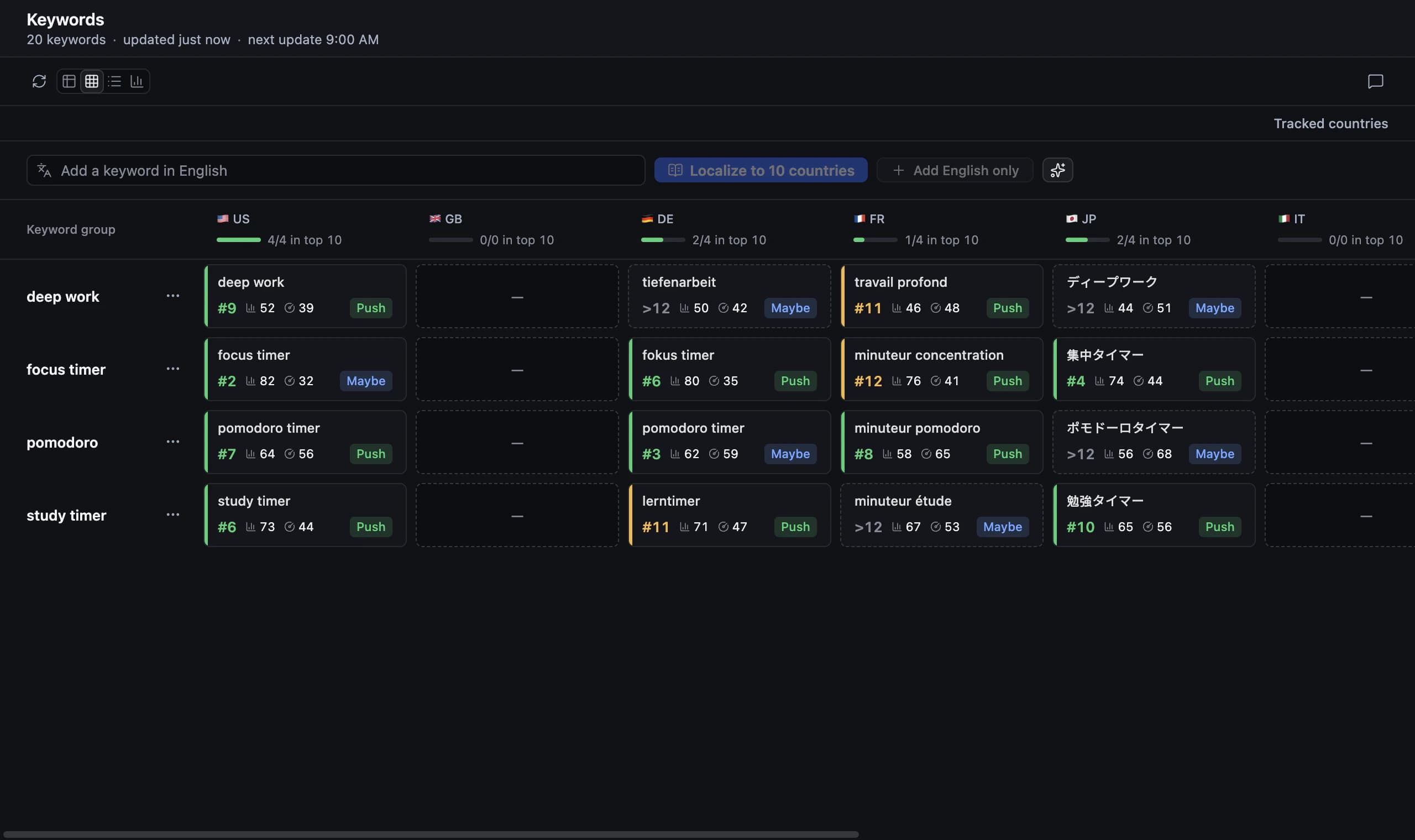
Choose an ASO tool for Mac around your next decision
Start with the question blocking your next release. A new app needs evidence that its proposed keywords describe the right audience. A published app may need to understand why relevant competitors appear above it. An App Store optimization tool becomes useful when its research leads to a specific decision you can revisit after publishing.
For a small team, a manageable routine matters more than collecting every possible metric. Choose an initial country, keep a short set of relevant searches, and write down the change you intend to test. In AppNorth, you can research an idea without adding an app, or add a published app by link or search before tracking it.
Connect keyword research with a regular ranking review
Separate relevance from opportunity. For example, “Pocket Grove” is a made-up plant-care app: “plant watering reminder” describes its job more closely than “garden design.” Inspect the results for each search before treating popularity as a reason to target it. A term that attracts the wrong audience is a poor use of limited listing space.
AppNorth supports App Store keyword research in all 175 App Store countries, plus Google Play research. Connect your own Apple Ads account to see Apple’s official popularity; without it, the value is “—”. Its difficulty indicator uses the apps already ranking. For iPhone searches, tracking reaches position 250 per keyword and country, with daily history and configurable checking frequency.
Turn a shortlist into a localized listing
Once you have a shortlist, give each proposed listing change a purpose. A clearer subtitle might explain a use case; a localized phrase might match how people describe that use case in another market. Keep a record of the wording you changed and its publication date. Avoid rewriting every locale at once when you still need to understand the first market.
AppNorth generates three AI drafts for the name, subtitle, and keywords, scored by reach and difficulty against the current listing within Apple’s character limits. It supports 50 App Store listing languages, plus promotional text and descriptions. Review and preview your choices before publishing: AppNorth fills an App Store Connect draft version with approved changes and never submits the app for review.
Plan how your Mac workspace and AI will work
When comparing ASO software Mac developers can use, include the practical details: your macOS version, where projects live, and how you move work between machines. AppNorth requires macOS 14 or later and supports Apple Silicon and Intel. There is no AppNorth account; projects, drafts, and keys stay on the Mac. Store keys are encrypted using a key kept in macOS Keychain.
AppNorth still makes online calls for license activation, updates, Apple, Google, and your selected AI provider. AI features use your own CLI, such as Claude Code, Codex, Gemini CLI, or Ollama; provider terms and costs apply. Another Mac on the same network can use the workspace after pairing with a one-time code. Export and restore local backups when planning your backup routine.
Budget for the workflow you will actually maintain
Compare ASO tools using their billing model, the machines you need, and any separate services your workflow requires. AppNorth costs €99.99 once for a lifetime license covering two Macs, with updates included. Payment goes through Polar. There is no free tier or trial, so check the supported workflow and system requirements before buying rather than assuming a subscription-style evaluation period.
A practical starting routine is to research one country, review your target searches, prepare a small listing revision, and revisit the ranking history after publication. Expand to another country when you can explain your choices in the first. AppNorth also supports Google Play positions, competitor comparisons, listing editing and publishing, and localized prices; working with Google Play requires a service account.
Before you start
Can I use AppNorth on an Intel Mac?
Yes. AppNorth supports Intel and Apple Silicon Macs running macOS 14 or later. The lifetime license covers two Macs. If you want another Mac on the same network to use the workspace, pair it with a one-time code. AppNorth also supports exporting and restoring local backups for your own backup process.
Is AppNorth a free ASO tool for Mac?
No. The Mac app costs €99.99 as a one-time payment and has no free tier or trial. The license covers two Macs and includes updates. AppNorth’s website has a separate free keyword checker showing the top 25 App Store results for a keyword and country, useful for an initial look at search relevance.
Do I need Apple Ads or an AI subscription to research keywords?
AppNorth can research keywords without an Apple Ads connection, but popularity then shows “—”. Connecting your own Apple Ads account supplies Apple’s official popularity; onboarding needs no campaign or card. AI features use your selected CLI and its provider’s terms and costs. AppNorth does not sell an additional balance of AI credits.
Can a Mac ASO tool help with Android apps?
Yes. AppNorth supports Google Play keyword research, positions, competitor comparisons, listing editing and publishing, and localized prices. You can add an Android app by link or from Play Console, and Google Play access requires a service account. Treat Android research as its own task: inspect its search results before reusing a shortlist developed for the App Store.
Keep exploring
AppNorth · macOS
Turn your research into a better listing.
€99.99 once. Lifetime license for 2 Macs, with updates included.
AI features use your own agent CLI: Claude Code, Codex, Gemini CLI, OpenCode, Cursor, Grok or Ollama. No AppNorth AI credits; your provider’s terms and costs still apply.
See AppNorth for MacmacOS only. No free tier or trial. No voluntary refunds; legal exceptions apply. Read the refund policy.