App Store Optimization, on your Mac
App competitor analysis that turns search rivals into useful decisions
App competitor analysis starts with the apps people see when they search for the problem you solve. Compare those results in a specific store and country, then use the evidence to choose keywords, sharpen your promise, and plan a change you can evaluate.
See AppNorth for Mac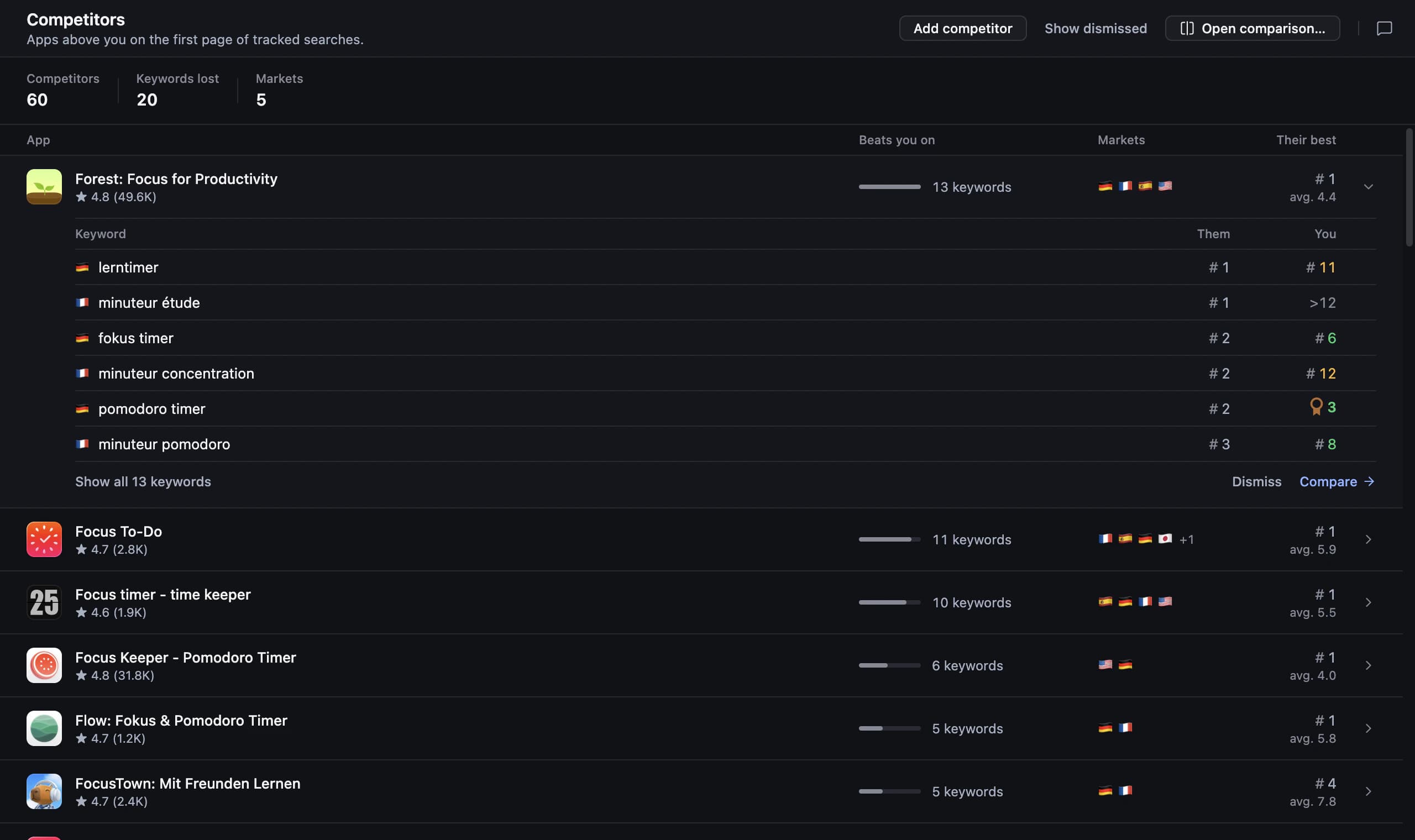
Start app competitor analysis with search intent
Choose one task, one store, and one country before building your comparison set. Search phrases a potential user might actually type, including a broad category and a more specific use case. Keep a small set of apps that repeatedly answer that need, plus an adjacent solution that approaches the problem differently. Record the date so later observations have context.
For example, imagine an app called TrailLedger for recording hiking expenses; this is a made-up example. A general budgeting app might compete for “trip expenses,” while a hiking guide appears for “hiking planner” without solving expense tracking. Both results teach you something, but only the first belongs in your direct comparison for the expense-tracking promise. Similar branding alone is a weak selection rule.
Find competitor app keywords through visible searches
To find competitor app keywords, begin with phrases you can observe: wording in public names, subtitles, descriptions, and the searches where an app appears. Treat these as candidate terms, then inspect the results for each phrase. A word appearing in a description does not establish that it drives discovery, and a search position does not reveal downloads or revenue.
Group candidates by intent rather than collecting every variation in one list. For TrailLedger, separate shared trip costs from mileage logs and packing lists. Drop terms for features the app lacks, even when competing apps use them prominently. For every remaining phrase, record the country, the relevant apps present, your current position if available, and why the search fits your product.
- Core task: the job your app already performs well.
- Specific audience: a useful qualifier that matches actual users.
- Adjacent need: a possible product direction to investigate separately.
- Excluded intent: searches that would create the wrong expectation.
Compare promises, evidence, and trade-offs
Mobile app competitive analysis should explain why someone would choose each option. Read the first visible promise, inspect the screenshots, and note the features shown as evidence. Compare the same dimensions across apps: intended audience, central workflow, localization, and the terms of any visible offer. Separate your observations from assumptions about the product behind the listing.
Read reviews manually for recurring situations, then check whether the complaint applies to your intended audience. A request for advanced team controls may be irrelevant to a solo-use app. Do not turn one frustrated review into a market conclusion. Instead, write a question for user research, such as whether hikers need shared expense entry when several people pay during a trip.
Turn ASO competitor analysis into one test
A useful gap combines a real user need, a capability you already provide, and wording that competing listings leave unclear. Write a hypothesis before changing metadata. In the fictional TrailLedger example, that could be: people organizing group hikes need to recognize shared expense tracking immediately. A subtitle emphasizing that task would be a focused change; promising a complete travel planner would misrepresent the product.
Record the old text, target searches, country, and release date. Choose a review window in advance and look at several observations instead of reacting to a single position. If downloads or conversion are part of the question, inspect your own store reporting alongside rank changes. A stronger rank can support a discovery hypothesis, but cannot establish that a wording change caused more paying users.
Research and compare competitors in AppNorth
AppNorth is a Mac app with App Store and Google Play keyword research. For tracked searches, it shows apps ranking above you, the keywords they beat you on, and the countries involved, alongside competitor comparisons and ratings. Start with relevant searches, then use those comparisons to investigate which promises deserve a closer manual look. Research can also begin without a published app.
For App Store research, popularity comes from Apple’s official Apple Ads popularity when you connect your own Apple Ads account; otherwise it shows “—”. Difficulty is an AppNorth indicator based on apps already ranking, not a promise of success. AppNorth tracks iPhone positions up to 250 per keyword and country with daily history, giving you observations to revisit after a metadata change.
Before you start
How do I find competitors for my app?
Search the task your app solves in the country and store you plan to target. Start with apps that repeatedly appear for relevant phrases, then check whether their main workflow serves the same audience. Keep direct substitutes separate from broader category apps. This makes your comparison useful even when your closest search rivals have unfamiliar names.
Can I see another app’s hidden App Store keywords?
A public listing does not reveal the developer’s private App Store keyword field. Build keyword hypotheses from visible wording and observed search results instead. When an app appears for a phrase, record that observation without claiming to know exactly which metadata produced it. Validate whether the phrase fits your own app before adding it to your research.
How often should I review app competitors?
Choose a review rhythm that matches your release schedule and the decisions you can act on. Revisit the comparison when you enter a country, change positioning, or see a sustained movement on an important search. Keep a dated baseline so a new observation can be compared with something concrete. Constantly rewriting metadata after isolated movements makes interpretation harder.
Can I compare iOS and Android competitors together?
You can compare their audience, core task, and positioning as part of a broader product review. Keep keyword results and ranking observations separate by store and country, however, so you do not treat an iOS observation as Android evidence. AppNorth supports keyword research and competitor comparisons for both App Store and Google Play; Google Play needs a service account.
Keep exploring
AppNorth · macOS
Turn your research into a better listing.
€99.99 once. Lifetime license for 2 Macs, with updates included.
AI features use your own agent CLI: Claude Code, Codex, Gemini CLI, OpenCode, Cursor, Grok or Ollama. No AppNorth AI credits; your provider’s terms and costs still apply.
See AppNorth for MacmacOS only. No free tier or trial. No voluntary refunds; legal exceptions apply. Read the refund policy.