App Store Optimization, on your Mac
Codex App Store optimization grounded in what you ship
Codex App Store optimization starts by matching the app you have built to the searches and promises in its listing. Give Codex a release scope, use store evidence to challenge the wording, and review a concrete metadata proposal before publishing.
See AppNorth for Mac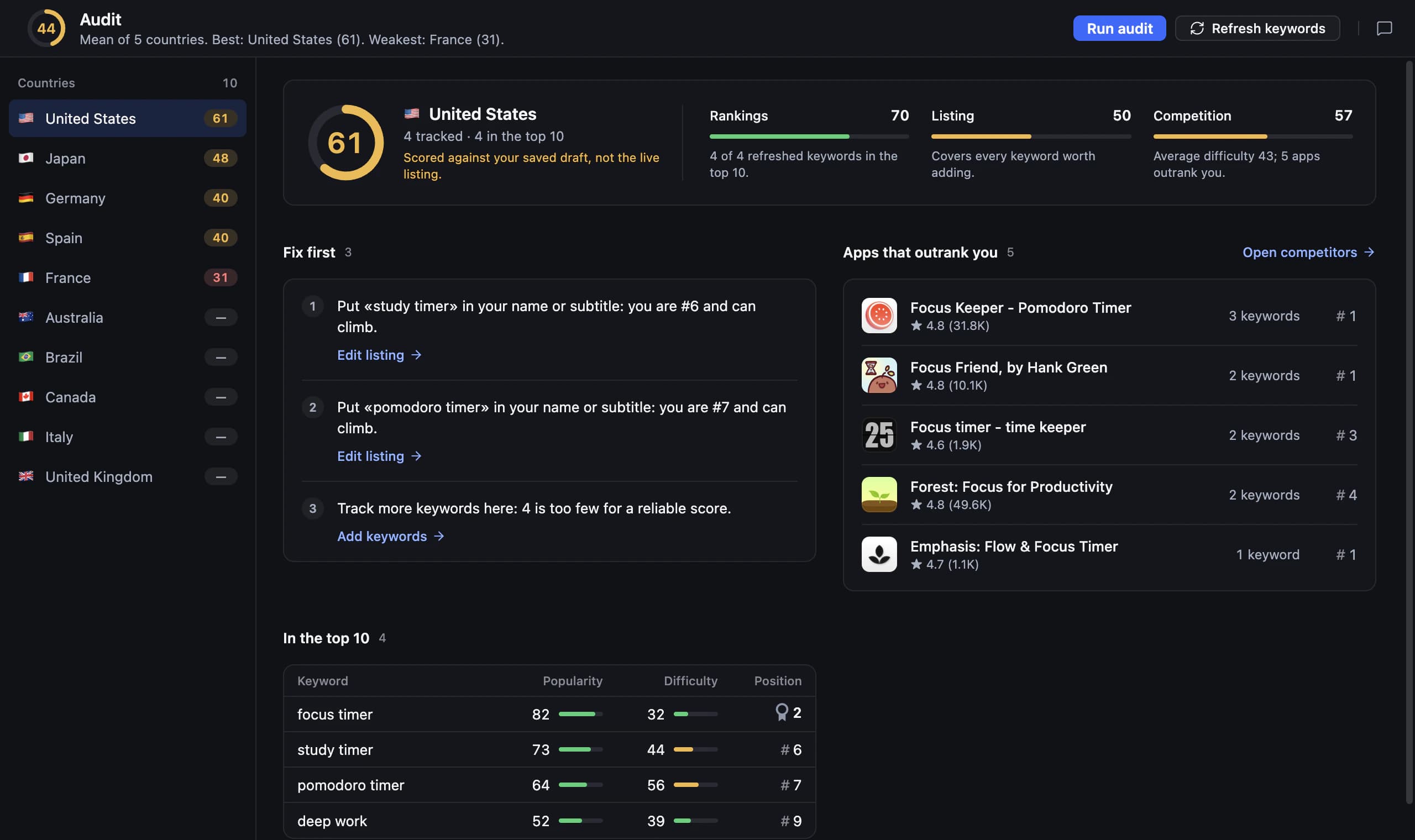
Start Codex App Store optimization with a release brief
A developer’s feature name and a customer’s search phrase often describe the same thing differently. “Session persistence” might mean that a workout app remembers an unfinished routine, but that phrase is unlikely to explain the benefit clearly. Before asking for keywords, identify the user task, the audience and which capabilities are actually available in the release.
Use Codex’s product context as a starting hypothesis, then validate the language outside the codebase. AppNorth connects the agent to a local MCP server with 127 tools for ASO work. Its keyword research, competitor comparisons and listing workflows let you connect a release brief to store evidence instead of turning internal terminology directly into public copy.
Add AppNorth to your Codex workflow
With Codex installed on your Mac, use AppNorth’s one-click “Add to Codex” action. AppNorth starts itself when the agent needs it. Add your published app by link or search, choose the country you want to work on and prepare a product brief. If you are still building, AppNorth also supports keyword research without an app.
Your first task should establish scope: “Use AppNorth to inspect the current listing and research context for this app in the US. Summarize the baseline and missing data. Do not edit or publish.” This request makes a useful checkpoint before drafting. Keep planned features separate from shipped features, particularly when your repository contains unfinished work alongside production code.
Give the agent acceptance criteria, not a vague goal
For TrailLedger, a fictional hiking journal used here as an example, ask: “Our release adds offline journal entries but no route navigation. Research relevant App Store searches in the US. Exclude navigation promises. Propose a subtitle direction and explain the competing results behind it. Return the evidence, assumptions and unresolved questions before drafting.” The excluded feature prevents an attractive but misleading direction.
ASO with Codex is easier to assess when you define what an acceptable answer contains. Require the target country, a user need, supporting store observations and the wording you would change. AppNorth’s product brief and “Don’t target” list help keep AI suggestions on the product. Update those inputs when the release changes rather than relying on an old conversation.
Review metadata as a proposed change
Ask Codex to present the current text beside the proposed text, then explain the trade-off for each field. A keyword-rich subtitle that hides the app’s purpose can be harder to understand than a clearer alternative. AppNorth offers three AI drafts for name, subtitle and keywords, scored by reach and difficulty against the current listing, within Apple’s limits.
Use a follow-up prompt: “For each alternative, show character counts, the product promise and why you kept or removed each keyword. Flag any claim the release brief does not support.” Apple allows 30 characters for the name, 30 for the subtitle and 100 for the keyword field. These are review criteria; fitting the limits alone does not establish relevance or demand.
Make missing evidence visible
Do not let a confident explanation turn an unknown into a measured result. AppNorth’s popularity comes from Apple’s official Apple Ads data when you connect your own account. Without that connection, popularity is “—”. Ask Codex to keep that distinction in its proposal and to avoid assigning a search-volume estimate just to complete a comparison.
Difficulty is AppNorth’s indicator based on the apps already ranking for the search, not a guarantee that your app can reach a position. Try: “Review the candidates again. Remove any conclusion that depends on unavailable popularity, and explain relevance separately from difficulty.” This is particularly useful for a new app, where you may have research context but no history of your own rankings.
Publish approved copy and define the next review
Review the final copy and any localizations in AppNorth before publishing. For App Store Connect, AppNorth fills a draft version with approved changes and never submits the app for review. Ask Codex to summarize the approved fields, country and rationale in your release notes, keeping the metadata decision easy to revisit alongside the product change that motivated it.
End the task with a measurement question: “Which tracked searches would help us review the hiking-journal subtitle hypothesis?” AppNorth provides iPhone positions up to 250 per keyword and country, daily history and configurable check frequency. Compare the relevant history after your change, while remembering that competitor activity and other changes can also affect positions. Treat the next review as another decision, not automatic proof of success.
Before you start
Can Codex optimize an App Store listing from my codebase?
Codex can use the product context you provide to help prepare a listing, but code alone does not establish search demand or release availability. Give it an explicit shipped-feature brief and use AppNorth research to check candidate language. Require evidence for keyword choices and review every public claim before publishing the approved metadata.
What is a useful first prompt for Codex ASO work?
Ask for a baseline before requesting rewritten copy: name the app, country, platform and release scope, then request the current listing, relevant keyword context and missing inputs. Finish with “Do not edit or publish.” Once you have checked that summary, ask for a small proposal with acceptance criteria and a reason for each change.
Does Codex submit my app to App Review through AppNorth?
No. For App Store Connect, AppNorth fills a draft version with approved metadata changes and never submits the app for review. Keep publication separate from the research request so that you can review the proposed copy first. The store workflow does not make an unverified product claim acceptable just because an agent drafted it.
Can I use this workflow for an Android release?
Yes. AppNorth supports Google Play research, positions, competitor comparisons, listing editing and publishing, and localized prices; a Google Play service account is required. Give Codex a separate Android release brief and review the resulting copy for that platform. Google Play publication goes through Google’s own review, so it needs its own release planning.
Keep exploring
AppNorth · macOS
Turn your research into a better listing.
€99.99 once. Lifetime license for 2 Macs, with updates included.
AI features use your own agent CLI: Claude Code, Codex, Gemini CLI, OpenCode, Cursor, Grok or Ollama. No AppNorth AI credits; your provider’s terms and costs still apply.
See AppNorth for MacmacOS only. No free tier or trial. No voluntary refunds; legal exceptions apply. Read the refund policy.