App Store Optimization, on your Mac
App ranking tracker for App Store keywords by country
An app ranking tracker shows where your app appears for a specific keyword in a specific country over time. That history helps you review listing decisions, spot searches that need attention, and investigate competitors. AppNorth tracks iPhone positions up to 250 per keyword and country, with daily history and configurable checking frequency.
See AppNorth for Mac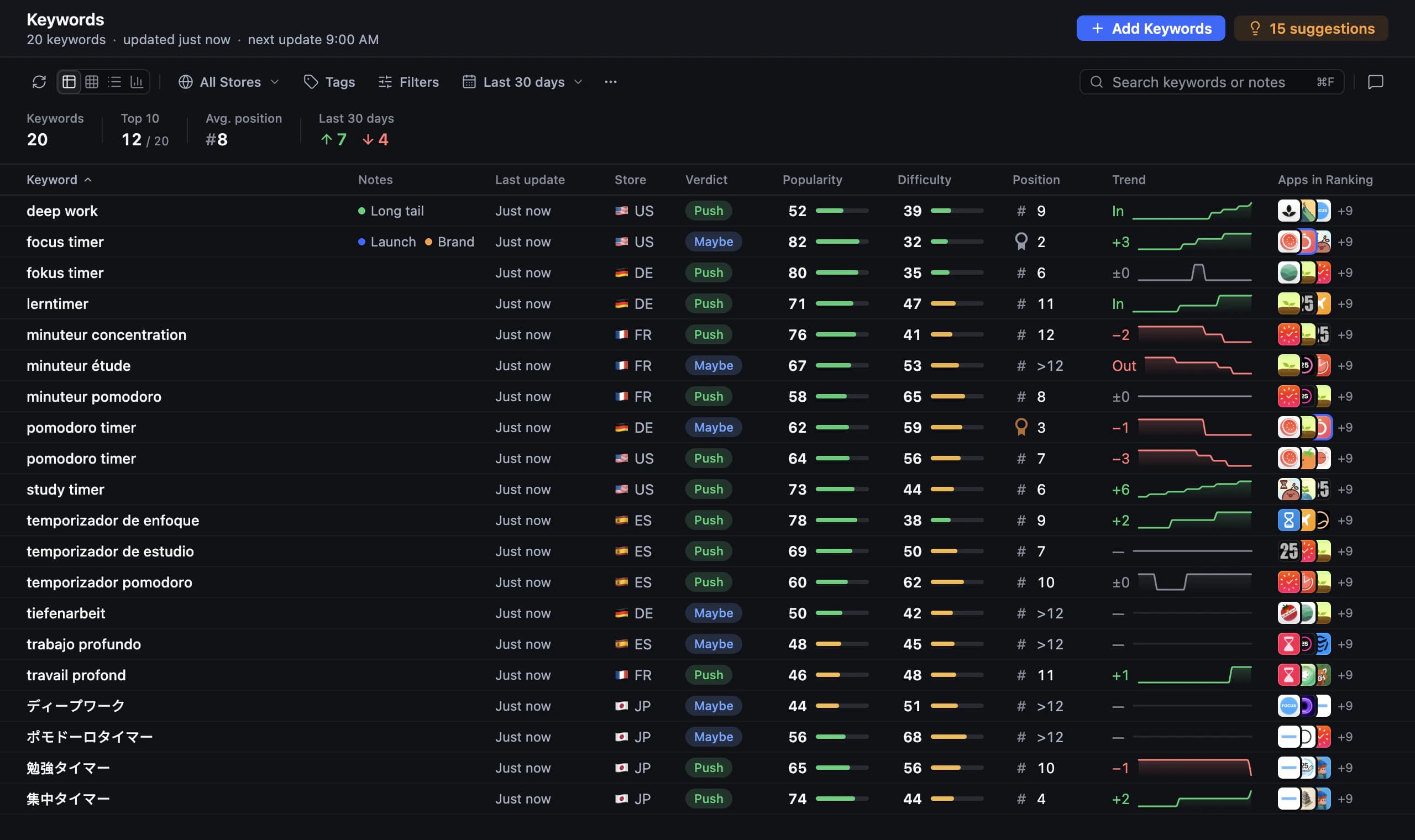
Set up an App Store rank tracker with a useful baseline
Start with searches that describe your app’s main job, rather than every phrase connected to its category. Include a few current targets and a few relevant opportunities, then choose the country you want to evaluate. Save the existing listing text and note its publication date separately. A baseline lets you compare later observations with an explicit starting point instead of relying on memory.
In AppNorth, add a published app by link or search and track iPhone keywords by country. Country boards and tables help you review the positions, while daily history gives you a record beyond a single lookup. Checking frequency is configurable for each app. Choose a frequency that suits your review routine, and remember that historical observations provide context rather than an explanation for every movement.
Read App Store keyword ranking as a pattern
A single higher position is a reason to look again, not enough evidence to declare a listing change successful. Compare several observations for the same keyword and country. Ask whether related target terms moved together and whether the improvement persisted. Separate visibility from business outcomes: a ranking chart does not tell you whether people who saw your app installed it or kept using it.
For example, “QuietDesk” is a fictional focus timer. Imagine it moves from position 42 to 31 for “study timer” after a subtitle revision. That is an observation, not a promised outcome or proof of cause. Keep watching the term and other relevant searches. AppNorth’s tracking reaches position 250; that limit does not support assigning an exact position to an app outside the tracked range.
Compare App Store ranking by country without averaging away detail
Treat a keyword’s position in each country as its own result. A strong position in one market does not establish visibility elsewhere, and a literal translation may describe a different intent. When reviewing a second country, confirm the search wording first. Then compare each market with its own earlier observations rather than blending unlike searches into a single number.
AppNorth provides country boards and tables for these reviews. Adding a country localizes existing keyword groups for it, which gives you candidates to inspect rather than a finished research decision. For QuietDesk, the example app, investigate whether local searches mean a study timer or a school timetable before tracking translated terms. Keep irrelevant translations out of the set you use to judge progress.
Use competing apps to investigate a ranking gap
When an important search weakens, inspect the apps above yours before rewriting the listing. Look for differences you can verify, such as a clearer use case in the visible text or a product aimed at another audience. A competing result can reveal an intent mismatch. Do not assume that copying its wording will reproduce its position or that its ranking proves which factor mattered.
AppNorth identifies apps that rank above you on tracked searches, the keywords where they beat you, and the countries involved. Competitor comparisons and ratings give you material for a closer review. Combine that information with relevance and difficulty when choosing what to work on. A gap on a search unrelated to your product is usually a reason to reconsider the target, not to add an unsupported feature claim.
Turn your app store keyword tracker into a review routine
Keep each review focused on an answerable question: did visibility improve for the intended task after the approved listing change? Note the release date, inspect the relevant history, and record what remains uncertain. If results are mixed, revisit the shortlist and the search intent before making another broad rewrite. Keep unrelated changes apart where practical so your own notes remain useful.
In AppNorth, you can move from research and competitor comparisons to three AI drafts for name, subtitle, and keywords, scored against the current listing by reach and difficulty. Review the proposed text before approving it. AppNorth fills a draft version in App Store Connect and never submits the app for review. Return to the country history after publication to assess visibility and decide your next step.
Before you start
How far down does AppNorth track App Store rankings?
AppNorth tracks iPhone positions up to 250 for each keyword and country. Interpret that as the tracking boundary, rather than evidence of an exact position beyond it. If a target does not appear within the tracked range, review its relevance and current competing results before deciding whether it still deserves space in your research shortlist.
How often are keyword rankings checked?
AppNorth provides daily history, and how often each app is checked is configurable. Choose a checking frequency that supports the decisions you need to make. Review several observations for the same keyword and country before reacting to a movement. Keep a separate note of publication dates so you can compare the history with the changes you actually released.
Does a higher keyword rank mean more app downloads?
A higher position shows improved placement for that tracked search; it does not establish more downloads. The query still needs to match your audience, and people must choose your app after seeing it. Use ranking history to evaluate search visibility, then examine your own acquisition and product results separately before deciding whether the change achieved its business goal.
Can I track Google Play positions as well?
Yes. AppNorth supports Google Play positions alongside keyword research, competitor comparisons, and listing editing and publishing. Google Play access requires a service account. The position-250 limit described on this page specifically concerns iPhone tracking. Build and review an Android keyword set separately, because your App Store shortlist does not establish which searches matter in Google Play.
Keep exploring
AppNorth · macOS
Turn your research into a better listing.
€99.99 once. Lifetime license for 2 Macs, with updates included.
AI features use your own agent CLI: Claude Code, Codex, Gemini CLI, OpenCode, Cursor, Grok or Ollama. No AppNorth AI credits; your provider’s terms and costs still apply.
See AppNorth for MacmacOS only. No free tier or trial. No voluntary refunds; legal exceptions apply. Read the refund policy.