App Store Optimization, on your Mac
ASO audit: find the listing fixes worth doing next
An ASO audit connects your listing’s promise with the searches and people it should serve. Start with a dated baseline for one country, check relevance and clarity, and finish with a short queue of changes whose effects you can observe.
See AppNorth for Mac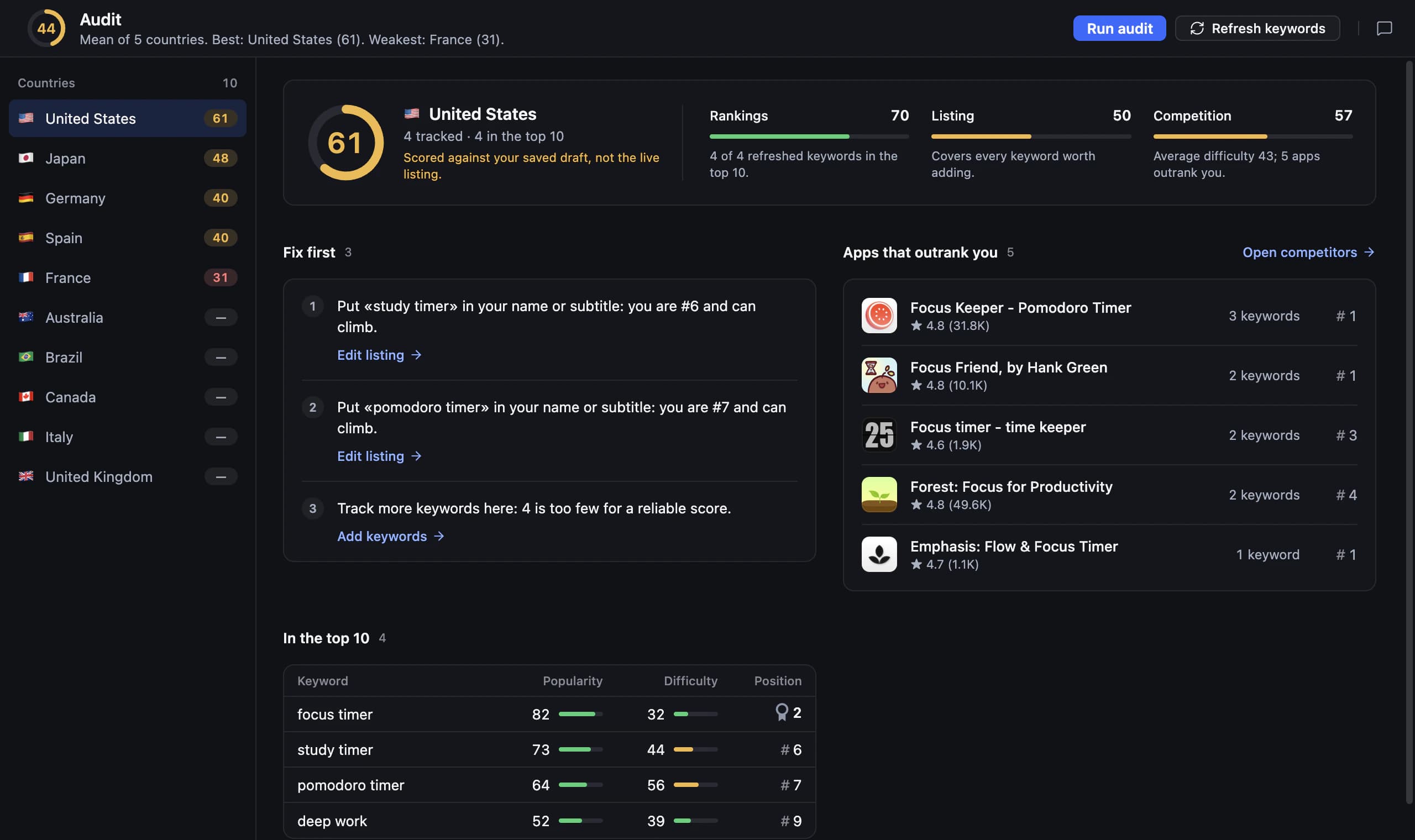
Give your ASO audit a clear scope and baseline
Choose one store, one country, and a specific question before inspecting the listing. Are relevant searches missing your app, or does the page fail to explain an existing feature? An app store audit becomes easier to act on when it separates discovery questions from decisions about product value. Save the current text, screenshots, target phrases, and available performance observations before making changes.
Record what changed recently, including product releases, pricing, and localization. These details matter when you interpret later movements. For example, PocketSprout is a fictional plant-care app whose listing emphasizes general gardening while its main feature is indoor watering reminders. Its audit should first examine whether the listing reaches that specific need, rather than immediately pursuing every broad gardening search.
Check metadata accuracy before adding more keywords
Read your name and subtitle as if you have never used the app. Can you identify its main task, and does the product deliver the promise? For the App Store, the name and subtitle each allow 30 characters, and the keyword field allows 100. The keyword field is comma separated and hidden from users; keep its role distinct from the visible copy that explains your app.
Review your own keyword field for irrelevant phrases and unnecessary repetition, then check each proposed replacement against actual search intent. Avoid adding an attractive term simply because another app uses it. Inspect screenshots and description manually for inconsistent claims, outdated features, or language mismatches. Keep a separate task for each issue so a metadata edit does not quietly become an unplanned redesign.
- Promise: the listing describes a feature users can actually use.
- Intent: each target phrase fits the task and audience.
- Fields: App Store drafts stay within the relevant character limits.
- Language: text and screenshots make sense for the chosen market.
- Consistency: the visible assets describe the same product and offer.
Compare search results and local expectations
Search your priority phrases and inspect the apps that answer them. If results mainly serve a different task, reconsider the phrase before rewriting the listing around it. Separate a relevance problem from a competitive one: a suitable phrase with established rivals calls for a different decision than a phrase whose audience would be disappointed by your product.
Repeat the review for each country you intend to support. Do not assume a translated phrase carries the same intent everywhere, or that one country’s rank describes another. In the fictional PocketSprout example, a literal translation of a broad gardening term might attract outdoor growers. A local phrase about indoor plant reminders could be a better candidate, but its results still need checking.
Turn your ASO audit checklist into a release plan
Rank findings by the user problem they address, the evidence behind them, and the work needed to fix them. Correct a misleading feature claim before polishing a minor wording preference. For PocketSprout, a sensible first batch could align the subtitle and first screenshot around watering reminders. That batch has a clear purpose; replacing every asset and targeting unrelated terms would make the outcome harder to interpret.
For each batch, write the hypothesis, the exact edits, and the observations you will review. Keep visibility measures separate from page conversion and product usage. After release, compare several observations with your saved baseline and note other changes that may explain the result. If ranks improve while downloads do not, investigate the next step in the journey instead of treating the audit as finished.
Use AppNorth as an ASO audit tool
AppNorth is a Mac app whose ASO audit provides a 0–100 score per country from rankings, listing, and competition, together with the few fixes that matter most. The full score needs Apple Ads popularity. Use the score to orient your review, then examine the underlying issue and decide whether the proposed work matches your app’s audience. A score is not a forecast of installs.
For App Store metadata, AppNorth’s Optimize flow creates three AI drafts for name, subtitle, and keywords, scored by reach and difficulty against the current listing and kept within Apple’s character limits. AI runs through your own supported CLI, with the provider’s terms and costs. Review and preview approved changes before AppNorth fills a draft version in App Store Connect; it never submits the app for review.
Before you start
What should an ASO audit include?
Include a dated country-specific baseline, a review of search intent and metadata, a comparison with relevant search rivals, and a prioritized change list. Check visible assets manually as well as keyword choices. Each finding should state the problem, the supporting observation, and the next action. A long collection of scores without decisions is difficult to use.
Can I do an ASO audit before launching an app?
You can review planned metadata, screenshots, target countries, and the searches your app hopes to serve. You cannot evaluate your own live positions or store conversion before the listing is available. Label those parts as unknown. AppNorth supports keyword research without an app, so you can investigate phrasing and competing results before you have a published product.
What is a good ASO audit score?
Treat a score as a diagnostic reference rather than a universal target. In AppNorth, the audit score runs from 0 to 100 per country and the full score needs Apple Ads popularity. Review the recommended fixes and underlying context. A higher score does not establish that users understand the product, that they will install it, or that a change caused growth.
How do I know whether an ASO audit helped?
Keep the previous listing, the dates of your edits, and the searches you intended to improve. Review rank observations alongside your own store performance data, then consider releases or other events that happened during the same period. Look for evidence that matches your hypothesis. One favorable day or a higher audit score alone does not demonstrate a business result.
Keep exploring
AppNorth · macOS
Turn your research into a better listing.
€99.99 once. Lifetime license for 2 Macs, with updates included.
AI features use your own agent CLI: Claude Code, Codex, Gemini CLI, OpenCode, Cursor, Grok or Ollama. No AppNorth AI credits; your provider’s terms and costs still apply.
See AppNorth for MacmacOS only. No free tier or trial. No voluntary refunds; legal exceptions apply. Read the refund policy.