App Store Optimization, on your Mac
Google Play ASO from keyword research to a reviewed listing
Google Play ASO connects the searches your Android app can answer with a listing that explains its value clearly. Work through relevance, messaging, localization, and measurement in that order so each change tests a specific idea rather than adding more keywords at random.
See AppNorth for Mac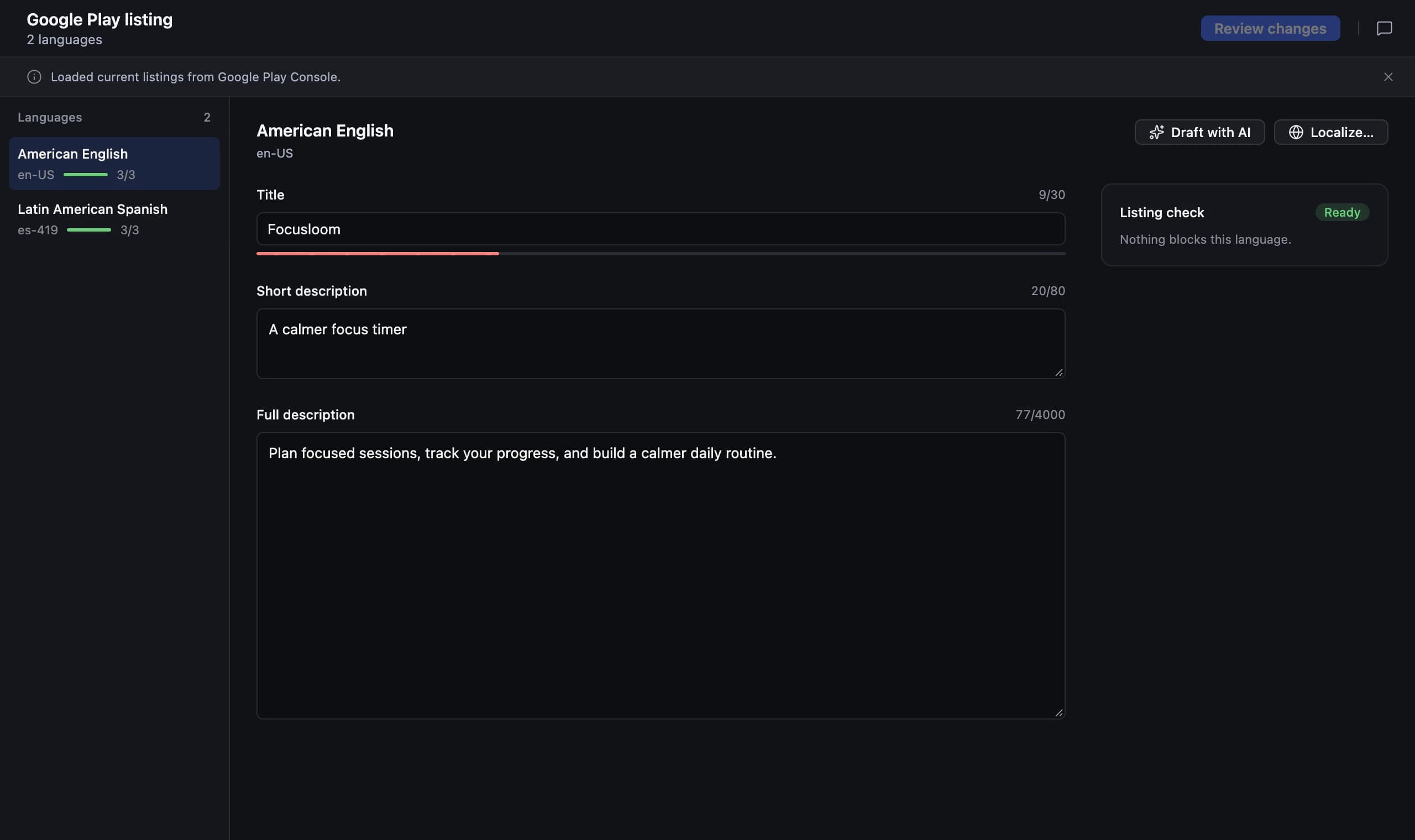
Start Google Play ASO with one user task
Describe who the app helps, what they want to do, and which features make that possible. That brief becomes your filter for keyword ideas and listing claims. A small utility can communicate one useful task clearly without trying to compete for every broad category term. Keep unsupported features on an explicit exclusion list.
Consider QuietCrate, a fictional offline focus timer used here as an example. “Focus timer” fits its core task, while “team project management” does not. Even if a broad planning query looks attractive, attracting users who need collaboration would create the wrong expectation. Choose an intent you can demonstrate in the first screenshots and the actual onboarding.
Do Play Store keyword research in the target country
For Play Store keyword research, build a short list around the task, the problem, and the context of use. Inspect results for each query in the country you want to reach. Note whether they show timers, calendars, audio apps, or another category entirely. Keep the wording only when the observed intent and your product fit together.
Compare competing listings to understand how they explain the task, then look for a truthful distinction your app can support. For QuietCrate, that might be an offline workflow rather than collaboration. Use observed positions as context, not a forecast. Write down why each candidate belongs in the listing before you decide where to place it.
Write Google Play fields for people making a choice
Plan around Google Play’s app name, short description, and full description. Google lists limits of 30, 80, and 4,000 characters respectively. The short description should communicate a useful outcome; the full description can explain how the app works, what is included, and any meaningful limitations. You do not need to fill every available character.
For the fictional QuietCrate example, a short-description draft could be “Plan focused work sessions with an offline timer.” Follow it with a plain explanation of session setup and reminders. Avoid repetitive keyword lists: Google warns against repetitive or irrelevant keyword usage in listing text. Review whether each sentence adds information that helps someone decide to install.
Plan Google Play listing localization around real usage
Google Play listing localization begins with the markets you can serve and the language reviewers you can involve. Research the local wording for the main task rather than translating a keyword list mechanically. Keep a small terminology sheet for the name, description, screenshots, and onboarding so users encounter a consistent explanation from search to first use.
Have a local reader describe the app after seeing the proposed listing. Check whether examples, screenshots, and language support match the product they will receive. If QuietCrate has an English-only interface, a translated listing needs to set that expectation clearly. Localized pricing is another decision to review, but changing price and copy together makes their individual effects harder to interpret.
Research and edit your Android listing in AppNorth
AppNorth is a Mac app that supports adding Android apps by link or from Play Console. Its Google Play workflow includes keyword research, positions, competitor comparisons, listing editing and publishing, and localized prices. It needs a Google Play service account. Use the research to choose a clear target intent before editing the listing text.
Use AppNorth’s position and competitor views to review the searches you are targeting, then check the proposed copy against your product brief. AppNorth’s Google Play publishing goes through Google’s own review. Include time for that review in your release plan and check the published listing afterward. AppNorth runs on macOS 14 or later, on Apple Silicon and Intel Macs.
Measure a listing change against its original purpose
Before editing, save the current copy and record the country, language, queries, and date. Write one sentence explaining the intended improvement, such as making the offline timer benefit clearer. Define which store reports and product outcomes you will review. Keeping the purpose narrow makes it easier to decide what to retain after the update.
Compare search visibility with listing visits, acquisitions, and the behavior of users who install, using the reports available to you. A position change does not explain whether those users found the product useful. Account for releases, promotions, and changes in traffic sources. If the evidence is too thin, keep observing rather than rewriting the entire listing after a single fluctuation.
| Field | Character limit | Writing goal |
|---|---|---|
| App name | 30 | Identify the app and communicate its purpose clearly |
| Short description | 80 | State the useful outcome in a readable sentence |
| Full description | 4,000 | Explain the workflow, features, and meaningful limitations |
Before you start
How do I start Google Play store optimization for a new app?
Write a product brief, choose a target country, and research a small group of relevant searches. Inspect the apps that appear and identify the task your product can solve convincingly. Then write the name and descriptions around that task, review screenshots and onboarding, and save a baseline before publishing changes.
How many times should I repeat keywords in a Google Play description?
Use a term when it helps explain the app; avoid choosing a repetition target. Google warns against repetitive or irrelevant keyword usage. Read the description as a prospective user and remove sentences that add no meaning. Cover the main task, useful features, and limitations naturally instead of inserting the same phrase into every paragraph.
Can I reuse my App Store copy on Google Play?
Use your product positioning as a starting point, then rewrite for Google Play’s fields and the Android experience. Review the short and full descriptions together, check screenshots against Android behavior, and research searches in the target market. A sentence that describes an iOS-specific workflow may need a substantial change even when the product name stays the same.
What do I need to manage Google Play ASO with AppNorth?
You need a Mac running macOS 14 or later and a Google Play service account for the Google Play workflow. You can add an Android app by link or from Play Console. AppNorth supports keyword research, positions, competitor comparisons, listing editing and publishing, and localized prices; Google Play publishing still goes through Google’s own review.
Keep exploring
AppNorth · macOS
Turn your research into a better listing.
€99.99 once. Lifetime license for 2 Macs, with updates included.
AI features use your own agent CLI: Claude Code, Codex, Gemini CLI, OpenCode, Cursor, Grok or Ollama. No AppNorth AI credits; your provider’s terms and costs still apply.
See AppNorth for MacmacOS only. No free tier or trial. No voluntary refunds; legal exceptions apply. Read the refund policy.