App Store Optimization, on your Mac
Cursor ASO for country research and localized listing copy
Cursor ASO connects the product context in your editor with the language people use to find an app. Start with a user outcome, investigate that intent in one market and review localized copy before expanding to more countries.
See AppNorth for Mac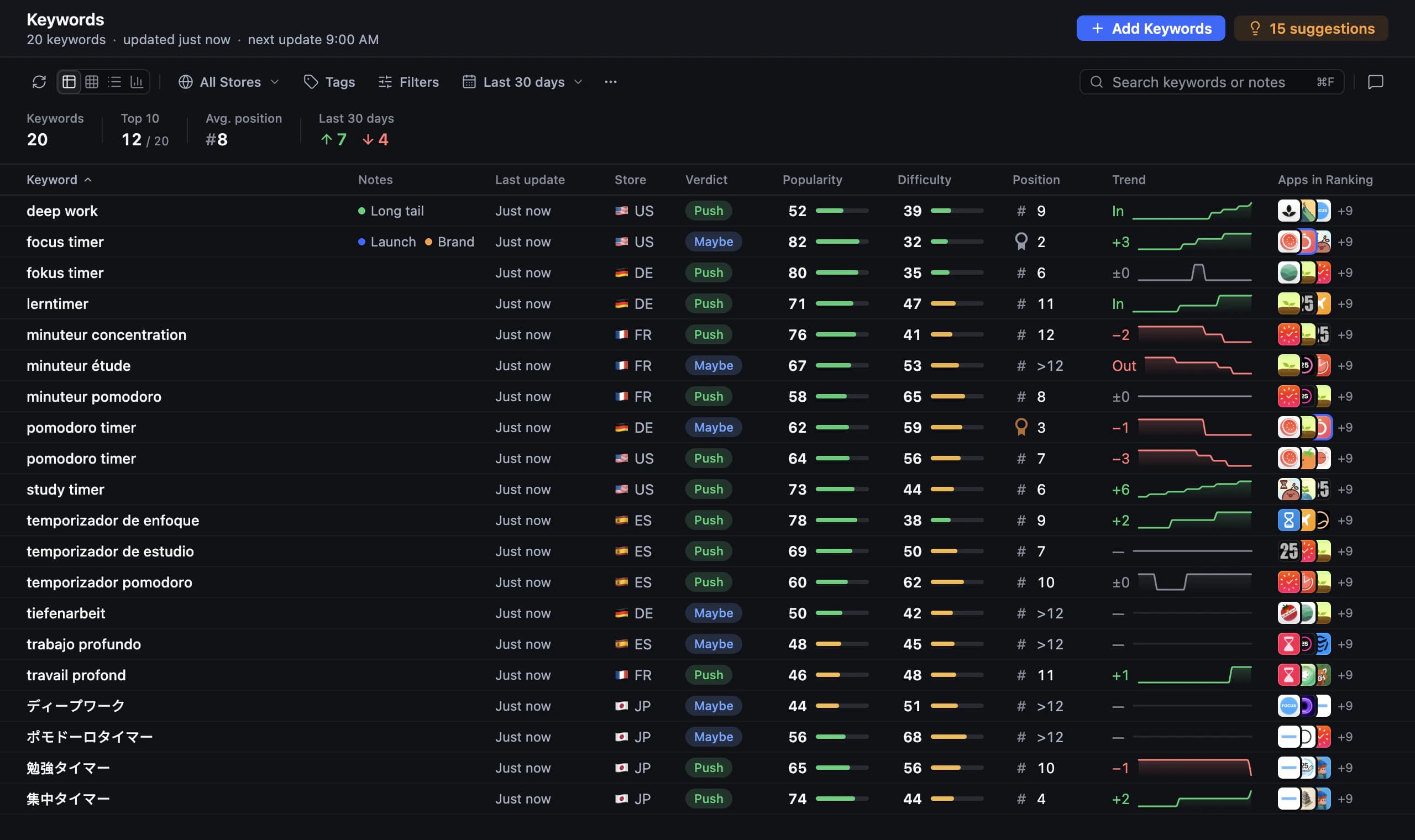
Start Cursor ASO with the user’s task
An editor gives you plenty of context about how an app works, but a store visitor needs to know what it helps them do. Before researching, describe one task in ordinary language. For a reading tracker, “remember what I have read” and “build a daily reading habit” are different directions, even when the same app serves both.
App Store optimization in Cursor should test those directions against the market rather than polish whichever phrase appears first. AppNorth provides keyword research and competitor comparisons through a local MCP server with 127 tools. Use that connection to compare the apps a search returns, then decide whether their audience and promise fit the task you chose.
Set up the Cursor MCP ASO connection
Install Cursor on your Mac and use AppNorth’s one-click “Add to Cursor” action for the installed agent. AppNorth starts itself when the agent needs it. Add a published app by link or search, or begin researching an idea without an app. Select a country before the first research request so the agent has a concrete market to inspect.
Keep a short product brief ready in AppNorth, along with a “Don’t target” list. In Cursor, provide the relevant product context and ask the agent to summarize the intended audience before proposing keywords. For example: “This app tracks books manually. Exclude ebook reading, audiobook playback and book summaries. Confirm that scope, then research relevant searches in the US.”
Compare search intent before editing copy
For ShelfPath, a made-up reading tracker used as an example, try: “Use AppNorth to compare ‘reading tracker’ and ‘book journal’ in the US. Explain which competing results address our manual logging workflow. Recommend a direction for the subtitle, list assumptions and stop before editing.” These example searches are hypotheses to investigate, not claims about measured demand.
Ask Cursor to explain a rejected direction as well as its preferred one. AppNorth’s competitor context includes apps that rank above you on tracked searches, the keywords they beat you on and the countries involved, plus comparisons and ratings. A competitor can help reveal an intent mismatch; its wording is not a reason to promise features your app lacks.
Localize the question before translating the answer
Once one market has a clear direction, open a separate task for the next country. Ask: “For Spain, investigate how someone would search for manual book logging. Check candidate Spanish wording against local results before translating the US subtitle. Explain any change in emphasis.” Literal translation can preserve the sentence while losing the search intent you wanted to address.
AppNorth localizes to 50 App Store listing languages and supports promotional text and descriptions; DeepL can translate keywords. Adding a country localizes existing keyword groups for it. Treat those localized groups as a research starting point, then check relevance in the new market. A listing language and a country answer different questions: wording alone does not establish where the opportunity is.
Review alternatives in the context of the whole listing
Ask Cursor for a compact review: “Compare the current and proposed name, subtitle and keywords. For each, explain the user benefit, unsupported claims and character count. Keep the same product scope across English and Spanish.” AppNorth offers three AI drafts for these fields, scored by reach and difficulty against the current listing and kept within Apple’s character limits.
Read the fields together instead of approving each in isolation. The name and subtitle should give a newcomer a coherent explanation; keywords should match the intended product. AppNorth provides review and preview before publishing. For App Store Connect, it fills a draft version with approved changes and never submits the app for review. Make publication a deliberate step after the language review.
Keep market evidence separate from persuasive wording
A fluent localized draft can still rest on weak evidence. AppNorth shows official Apple Ads popularity only with your own connected Apple Ads account; otherwise it displays “—”. Ask Cursor to identify that gap in its recommendation. Difficulty is an indicator based on ranking apps, so neither a polished sentence nor an encouraging difficulty signal proves that people will find your app.
After a change, return to the country and intent you originally selected. AppNorth tracks iPhone positions up to 250 per keyword and country with daily history and configurable check frequency. Ask Cursor to summarize the relevant history and propose the next research question. Compare observations across markets carefully; different competitive results can make a direct country-to-country comparison misleading.
Before you start
How do I connect Cursor to AppNorth for ASO?
Install Cursor on your Mac, then use AppNorth’s one-click “Add to Cursor” action. Start with a request that names the app or idea, platform and country, and asks for a research summary before changes. AppNorth starts itself when the agent needs it, and its local MCP server provides 127 tools for the ASO workflow.
Does Cursor ASO with AppNorth work on Windows?
AppNorth is a Mac app for macOS 14 or later, supporting Apple Silicon and Intel. It has no Windows or web app. This workflow therefore uses Cursor with AppNorth on a Mac. If you already use Cursor elsewhere, account for the Mac requirement when deciding where to keep the ASO workspace and review listing drafts.
Can Cursor translate all my App Store keywords at once?
You can ask for localized candidates, and AppNorth localizes existing keyword groups when you add a country. Review those candidates against that market’s search results before using them. AppNorth also localizes listings to 50 App Store languages. Translation helps produce wording, while country research helps assess whether the wording fits the audience and competing results.
Will local MCP keep every prompt away from my AI provider?
A local connection does not mean the entire AI workflow is offline. AppNorth keeps projects, drafts and keys on your Mac, while AI features run through your own CLI under your provider’s terms and costs. Choose the product context you share with Cursor deliberately. Store keys are encrypted with a key kept in macOS Keychain and sent only to Apple or Google.
Keep exploring
AppNorth · macOS
Turn your research into a better listing.
€99.99 once. Lifetime license for 2 Macs, with updates included.
AI features use your own agent CLI: Claude Code, Codex, Gemini CLI, OpenCode, Cursor, Grok or Ollama. No AppNorth AI credits; your provider’s terms and costs still apply.
See AppNorth for MacmacOS only. No free tier or trial. No voluntary refunds; legal exceptions apply. Read the refund policy.